
Police Report In, Retainer Out: Under Two Minutes
Here's the pitch: a paralegal uploads a police report PDF. Less than two minutes later, every field in their case management system is populated, a retainer agreement has been generated with correct pronouns and details, a statute of limitations reminder is on the attorney's calendar, and a personalized email with the retainer attached is sitting in the potential client's inbox.
That's what I built for the Swans Applied AI Hackathon, an end-to-end intake automation system for a personal injury law firm. And the interesting part isn't the AI. It's everything around it.
The Problem Nobody Talks About
Personal injury law runs on speed. The first firm to reach a potential client after an accident has a massive advantage. But the intake process, the thing that sits between "new lead" and "signed retainer", is a bottleneck that most firms just accept.
Here's what a typical intake looks like: a paralegal receives a police report, manually reads through it, extracts 18+ fields by hand, enters everything into Clio (the case management system), drafts a retainer agreement from a template, writes a personalized email to the client, creates a calendar entry for the statute of limitations, and posts a case note. Twenty to thirty minutes per case. And that's if they don't make a transcription error along the way.
The hackathon challenge from Swans was straightforward: automate this for Richards & Law. But the real constraint wasn't technical. It was trust.
You can automate everything, but if the paralegal doesn't trust the extracted data, they'll still manually verify every field against the original report. You've just added a step instead of removing one. So my primary design question became: how do I make the paralegal confident enough to verify in 60 seconds instead of 20 minutes?
That question shaped every decision that followed.
The Architecture
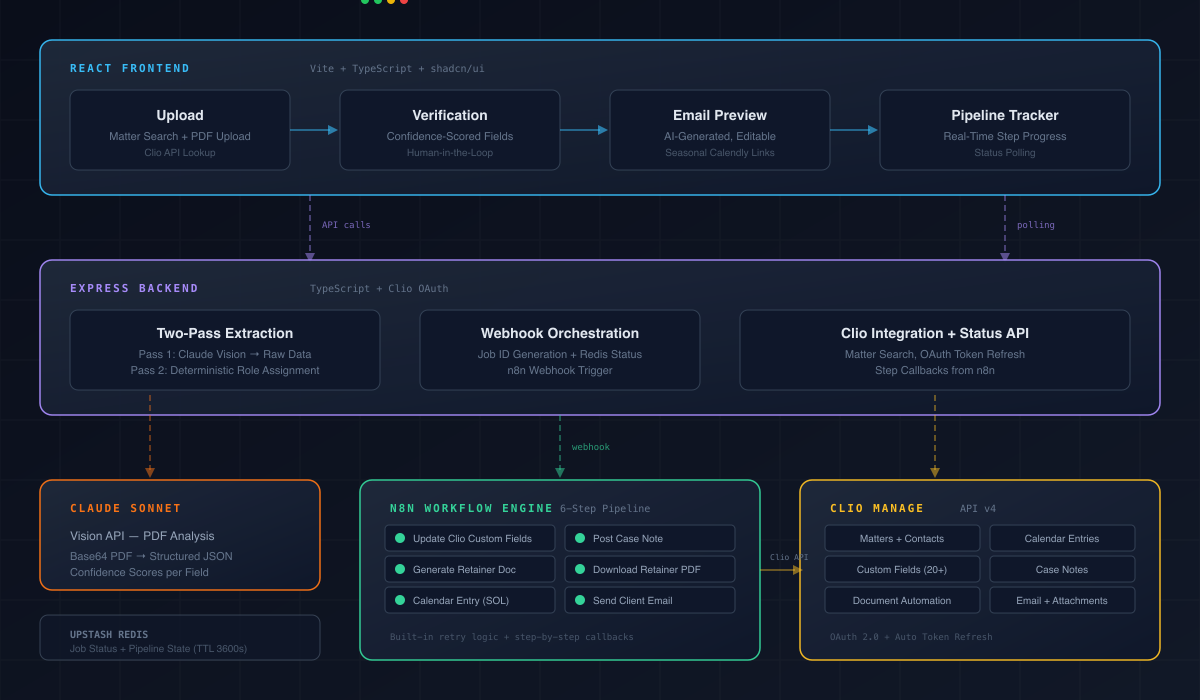
I landed on a three-layer system, and the separation is intentional.
React frontend (Vite + TypeScript + shadcn/ui) handles the interactive workflow: upload, verification, email preview, pipeline tracking. Everything the paralegal touches directly.
Express backend (TypeScript) handles PDF extraction via Claude's vision API, Clio OAuth authentication, and webhook orchestration. The parts that need to be fast and responsive.
n8n workflow engine handles everything that happens after the paralegal clicks submit: updating Clio custom fields, generating the retainer, creating calendar entries, posting case notes, downloading the PDF, sending the email. The parts that need to be reliable and sequential.
Why not just do everything in the Express backend? Because the post-submission pipeline is six sequential steps that each hit Clio's API, and some of them are asynchronous. n8n gives me built-in retry logic, step-by-step observability, and error handling that would take days to build from scratch. The frontend and backend handle what needs to be interactive. n8n handles what needs to be reliable. Each layer does what it's best at.
The Two-Pass Extraction Trick
This is where most of the complexity lives, and it's the decision I'm most proud of.
Police reports list vehicles by number (Vehicle 1, Vehicle 2) not by legal role. If you ask an LLM to extract data and assign "client" vs "defendant" in a single pass, it will hallucinate role assignments. It'll guess. Sometimes it'll get it right. Sometimes it won't. And in legal work, "sometimes" isn't good enough.
So I split extraction into two deliberate passes.
Pass one: Claude Sonnet's vision API analyzes the police report PDF and extracts raw structured data for each vehicle: driver name, gender, address, vehicle description, plate number, insurance code, officer information, narrative. No role assignment. No interpretation. Just structured data with confidence scores for every field.
Pass two: a fully deterministic algorithm assigns roles using a priority stack:
- Vulnerable road user rule: if one party is a cyclist, pedestrian, or scooter rider, they're the client. Always. This reflects legal reality.
- Filename pattern matching: the file "REYES v FRANCOIS.pdf" maps directly to client vs defendant.
- Fault keyword analysis: scan the narrative for phrases like "FAILED TO YIELD" or "RAN A RED LIGHT" near a driver's name.
- Default fallback: Vehicle 1 is assumed to be the client. The paralegal can swap with one click if it's wrong.
The key insight: the AI handles what it's good at (reading messy PDFs and extracting structured data), and deterministic code handles what it's good at (applying rules consistently). The role assignment is explainable, auditable, and overridable. No black box.
Confidence Scoring Changed Everything
Most AI systems output confidence scores as an internal metric. A number in a JSON response that maybe gets logged somewhere. I turned it into the primary UX element.
Every extracted field has a confidence badge:
- Green (85%+): high confidence. Scan it in a second, move on.
- Amber (60-84%): medium confidence. Worth a quick cross-check against the PDF.
- Red (below 60%): low confidence. Stop and verify manually.
The verification form auto-scrolls to the first low-confidence field. The paralegal's attention goes exactly where it needs to go. Instead of comparing all 18+ fields against the original report, they focus only on what the AI is uncertain about.
This single decision is what turns a 20-minute verification into a 60-second one. The confidence scores aren't decorative. They restructure the entire workflow.
The Details That Make It Real
Building a demo is easy. Building something that produces output a lawyer would actually send to a client. That's where the craft is.
Name normalization. Police reports print everything in ALL CAPS. These names flow directly into a legal retainer agreement. "JOHN MCALLISTER" needs to become "John McAllister", not "John Mcallister". "JEAN-PAUL O'BRIEN" needs to become "Jean-Paul O'Brien". I built a normalization layer that handles Mc/Mac prefixes, apostrophes, and hyphenated surnames. Small thing. But a retainer with "Mcallister" in it screams "generated by a machine."
Pronoun mapping. The retainer agreement uses gendered language like "his vehicle" and "her injuries". The system reads the gender field from the police report and derives subject, object, and possessive pronouns. The generated retainer reads like it was drafted by a person, because the grammar is correct throughout.
Seasonal Calendly routing. The client email includes a consultation booking link. March through August, it's an in-office link. September through February, it's virtual. A small detail that shows the system understands how the firm actually operates.
Template selection. The retainer template changes based on whether there are injuries or just property damage. The system reads the injured count from the police report and selects the correct template automatically.
None of these are technically impressive in isolation. Together, they're the difference between a hackathon demo and a system someone would actually deploy.
The Six-Step Pipeline
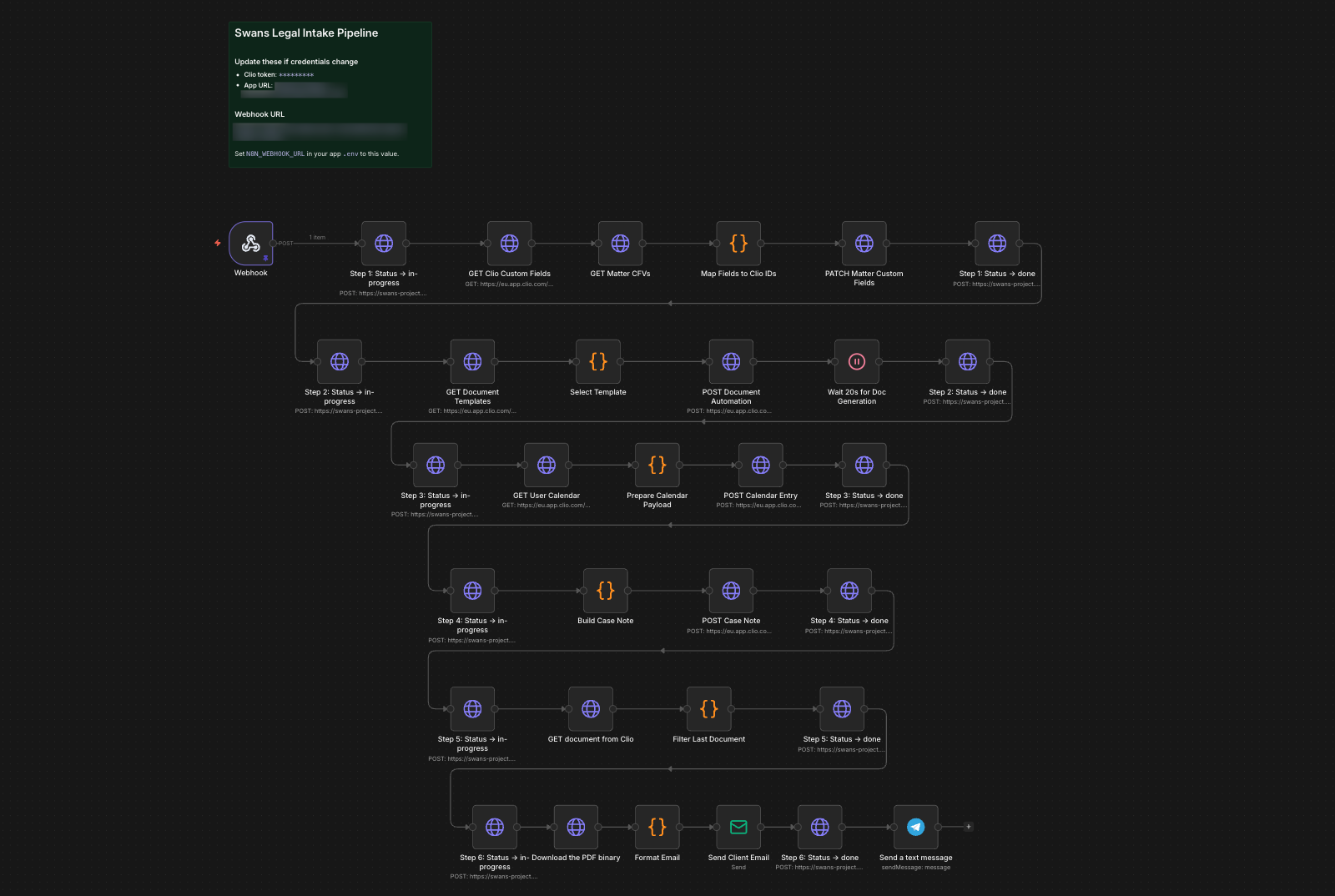
Once the paralegal clicks submit, six things happen automatically, and they can watch every step in real-time.
- Update Clio custom fields: 20+ fields including accident details, defendant info, vehicles, insurance, officer data, and pronoun mappings
- Generate retainer agreement: using Clio's native document automation API, not a custom PDF library
- Create statute of limitations calendar entry: on the responsible attorney's calendar
- Post structured case note: intake summary on the matter
- Download retainer PDF: from Clio's document management
- Send client email: personalized message with the retainer PDF attached
I deliberately chose Clio's document automation over building my own PDF generation. The template lives in Clio where non-technical staff can edit it. Merge fields and conditional logic are handled by Clio's engine. The generated document auto-stores in Clio's document management. It's the right long-term call, even though it added complexity: Clio's document automation API is asynchronous, so I had to build a polling mechanism that waits for generation to complete before downloading.
Each step calls back to my Express server with a status update, and the frontend polls for changes. The paralegal sees exactly what's happening and exactly where it is.
The Result
I placed 5th out of all submissions at the Swans Applied AI Hackathon, top 5 out of the field, with a $10K prize pool distributed across winners.

What I'd Do Next
No system is done after a hackathon. Here's where I'd take this.
Confidence feedback loop. Every time a paralegal corrects an extracted field, that's a training signal. Track which fields get corrected most frequently and use that data to refine extraction prompts. If a particular precinct's reports consistently produce low-confidence scans, flag it automatically.
Intake CRM integration. Right now, the paralegal manually uploads the PDF. Connect this to a client portal or intake CRM like Clio Grow, and the upload step disappears entirely. A new lead submits their police report through a form, the pipeline fires automatically, and the paralegal just gets a notification to verify.
Document type expansion. The extraction pipeline is prompt-driven. Swapping in a new document type (medical records, insurance correspondence, court filings) means writing a new extraction prompt and mapping the output fields. The Clio integration layer, the verification UI, the pipeline tracker are all reusable.
Firm-wide analytics. Aggregating extraction data across cases gives management visibility they've never had: average intake speed, case volume trends, paralegal workload distribution.
The Real Lesson
This hackathon reinforced something I keep coming back to: the AI is the easy part.
Calling Claude's vision API to extract text from a PDF? That's a few dozen lines of code. The hard part is everything else. Designing a confidence system that changes how people work. Splitting extraction from role assignment so the system is auditable. Normalizing names so a generated document passes the "would a lawyer actually send this?" test. Choosing Clio's native automation over a quicker custom solution because it's the right call for the people who'll maintain the system.
The best AI systems aren't impressive because of the AI. They're impressive because someone thought carefully about where the AI ends and the rest of the system begins.
That's what I built. And I'd build it again.